9:16 vs 1:1 vs 16:9: Which Aspect Ratio Should You Use for Each Platform?
Quick answer
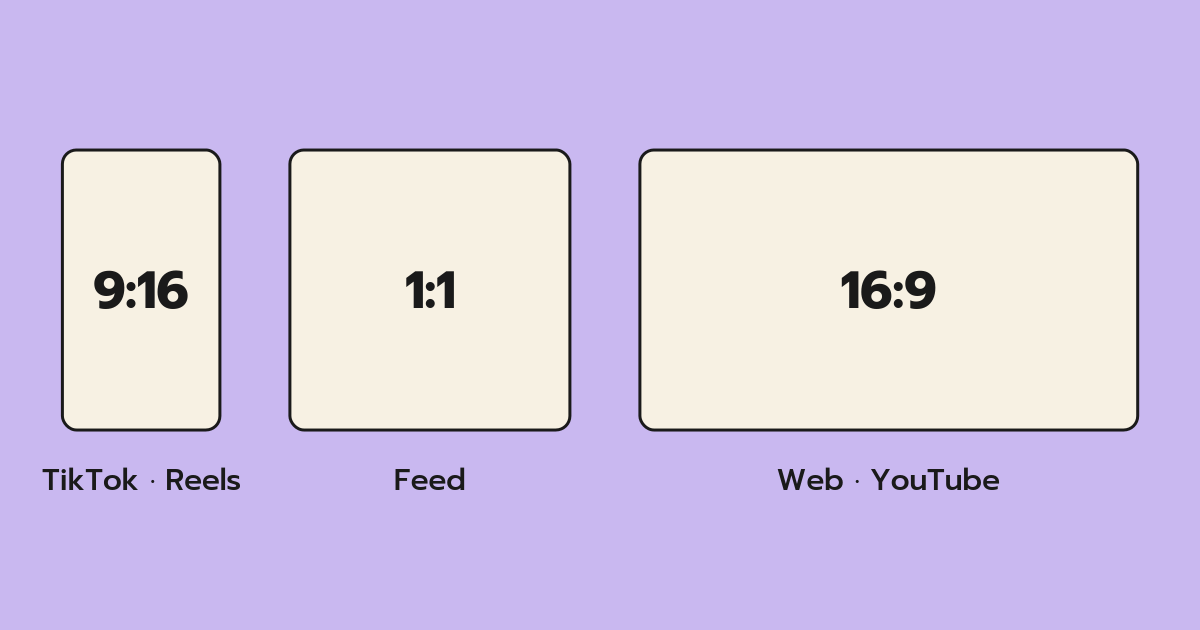
Use 9:16 (vertical, full-screen) for TikTok, Instagram Reels, Facebook Reels and Stories. Use 1:1 (square) when one clip must sit in feeds on several platforms. Use 16:9 (horizontal) for landscape edits, websites and presentations. Keep the original ratio when cropping would cut out the subject.
Free · Instagram, Facebook & TikTok · Only use clips you own or have permission to use.
Key takeaways
- Vertical 9:16 fills a phone screen and is the default for short-form video.
- Square 1:1 is a safe "works everywhere" feed format, though it uses less screen.
- 16:9 is for horizontal viewing — desktop, TV, embedded video and landscape edits.
- Crop around the subject, not the center of the frame.
- Keep text and faces out of the edges where app buttons and captions sit.
On this page
What is an aspect ratio?
An aspect ratio is the relationship between a video's width and its height. 16:9 means 16 units wide for every 9 tall — a landscape rectangle. 9:16 is the same shape turned on its side. 1:1 is a perfect square.
Resolution (like 720×1280) tells you how many pixels there are; the ratio tells you the shape. Two videos can share a ratio but have different resolutions.
Why the ratio matters more than ever
Most social viewing happens on phones held upright. A clip that matches the screen shape fills it; a clip that doesn't gets black bars or a small window. Meta's own guidance for Stories and Reels placements notes that most people hold their phones vertically, so vertical formats cover the most screen. Filling the screen isn't just cosmetic — it's the difference between a viewer seeing your detail shot clearly or squinting at a letterboxed strip.
Which ratio for which platform
| Where it will play | Best ratio | Notes |
|---|---|---|
| TikTok | 9:16 | Full-screen vertical is the native format |
| Instagram Reels & Stories | 9:16 | Same shape as TikTok |
| Facebook Reels & Stories | 9:16 | Meta now treats most new Facebook videos as Reels |
| Instagram / Facebook feed | 1:1 (or 4:5) | Square is the safe cross-platform choice |
| Website, slides, desktop, landscape edits | 16:9 | Horizontal viewing |
| A clip you'll re-edit later | Original | Keep every pixel until you know the final shape |
How to choose: a 3-question decision guide
1. Where will most people watch it?
If the answer is "on a phone, in a short-form feed", start with 9:16. If it's going into a landscape edit or onto a web page, choose 16:9.
2. Is this a final post or raw B-roll?
For B-roll you'll drop into a bigger edit, match the ratio of that project. Building a vertical Reel? Export your cutaways in 9:16 so they slot onto the timeline without re-cropping. Unsure where it will end up? Keep the original.
3. Will the crop cut out what matters?
Turning a wide 16:9 shot into 9:16 removes roughly two-thirds of the width. Before you commit, ask: is the subject in the middle third? If someone's hands are on the far left of the frame, a center crop will lose them.
When to keep the original ratio
"Original" is underrated. Keep it when:
- You're archiving clips into a B-roll library and don't yet know their final use.
- The shot is a wide landscape where the whole frame is the point.
- You'll reframe manually in an editor with keyframes later.
You can always crop later; you can't un-crop.
Common mistakes
- Cropping dead center by habit. Frame around the subject's eyes or the action instead.
- Ignoring safe zones. On vertical apps, buttons run down the right edge and captions cover the bottom area. Keep key text and faces in the central area.
- Mixing ratios in one edit. A 16:9 cutaway inside a 9:16 Reel creates black bars and looks recycled.
- Upscaling tiny crops. A heavily cropped small clip will look soft. Start from your highest-quality source.
How VDOHBoost fits
VDOHBoost is a free web app for turning clips you own or have permission to use from Instagram, Facebook or TikTok into B-roll. Pick the crop that matches the project you're editing using the guide above.
In VDOHBoost the flow goes Paste → Trim → Done:
- Paste a link to your own clip
- Tick the rights checkbox
- Press "Get clip" and wait for loading
- Trim the clip on the "READY TO TRIM" screen
- Choose a crop: Original, 9:16, 1:1 or 16:9
- Export, then "Download MP4"
Try it with one of your own clips →
FAQ
What is the best aspect ratio for Instagram Reels?
9:16 vertical. It fills the whole phone screen, matching how Reels are viewed. Other shapes will show with bars or be cropped by the app, so if your source is horizontal, reframe it to 9:16 around the subject before posting.
Is 1:1 square video still worth using?
Yes, for feed posts that need to work across several platforms. Square displays cleanly in Instagram and Facebook feeds and on desktop. It covers less of a phone screen than vertical video, so for Reels and TikTok, 9:16 is usually the better choice.
What aspect ratio does TikTok use?
TikTok is built around full-screen 9:16 vertical video. Square and horizontal uploads play, but with empty space around them. Keep important text away from the right edge and bottom, where buttons and captions appear.
Can I turn a 16:9 video into 9:16?
Yes, by cropping to a vertical slice of the frame. You'll lose most of the width, so check that the subject sits inside the area you keep. Shots with a centered subject crop best; wide group shots often need the original ratio instead.
Does cropping reduce video quality?
Cropping removes pixels, so a 9:16 crop from a landscape clip has less resolution than a native vertical shot. Start from the best-quality version of your own footage and avoid cropping already small clips.
Summary
Match the ratio to where the video will be watched: 9:16 for vertical apps, 1:1 for shared feeds, 16:9 for landscape, and Original when in doubt. Frame around your subject, respect safe zones, and keep your B-roll in the same shape as the edit it's going into.
Ready to crop your own clip?
Paste a link to an Instagram, Facebook or TikTok clip you own or have permission to use.
Paste a link to your clip